🔐 𝐒𝐢𝐧𝐠𝐥𝐞 𝐒𝐢𝐠𝐧-𝐎𝐧 (𝐒𝐒𝐎) — 𝐇𝐨𝐰 𝐈𝐭 𝐖𝐨𝐫𝐤𝐬 & 𝐖𝐡𝐲 𝐈𝐭 𝐌𝐚𝐭𝐭𝐞𝐫𝐬
In today’s digital world, organizations rely on dozens—sometimes hundreds—of apps. Asking employees to remember separate passwords for each one isn’t just inconvenient… it’s a security risk.
That’s where Single Sign-On (SSO) comes in.
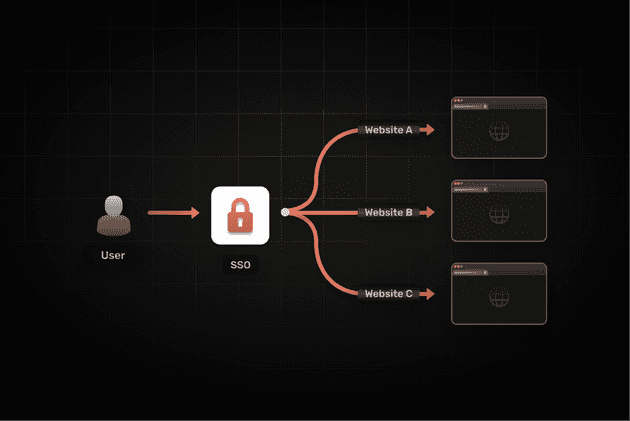
SSO lets users authenticate once and gain access to multiple applications without needing to log in again. It’s simple, secure, and essential for modern identity management.
🔍 What Is SSO?
Single Sign-On is an authentication method that lets users access multiple apps or services with a single set of login credentials. It improves user experience while enhancing security by reducing password fatigue, password reuse, and identity-based security risks.
⚙️ How SSO Works
users log in to the application (user request)
identity provider will verify the credential
Idp will generate a unique token which will confirm your identity
when you access any another application it will trusts this token and logs you in
SSO is based on trust relationships between applications and the identity provider (IdP).
🧩 𝐓𝐲𝐩𝐞𝐬 𝐨𝐟 𝐒𝐒𝐎 & 𝐇𝐨𝐰 𝐓𝐡𝐞𝐲 𝐖𝐨𝐫𝐤
1️⃣ SAML SSO (Security Assertion Markup Language)
Imagine you walk into a building and show your ID card to the security guard at the entrance.
Once you're inside, you can access all rooms without showing your ID again.
SAML SSO works exactly like that — but for websites and apps.
SAML tokens are XML-based security tokens containing assertions about a user’s identity, attributes, and entitlements. They are commonly used in enterprise environments for web-based single sign-on between different domains or organizations.
👨💼 Real-Time Example: How an Employee Uses SAML SSO at Work
Let’s say you work at a company and you want to check your pay slip or leave balance on the HR portal. Here’s what happens behind the scenes:
You open the HR portal (Workday)
You get redirected automatically to your company’s login page.
This might be:
Okta
Azure AD
Google Workspace
You log in there — ONCE.
The identity provider creates a “SAML Assertion”
A SAML Assertion is a secure message that says:
-- Who you are
-- You successfully logged in
🔍 SAML in Very Simple Words
SAML = A secure message that proves who you are.
SSO = Log in once → access multiple apps.
IdP (Identity Provider) = The system that logs you in (Okta, Azure AD).
SP (Service Provider) = The app you want to use (Workday, Salesforce).
2️⃣ OAuth 2.0 + OpenID Connect (OIDC) SSO
OpenID Connect (OIDC) → Proves who you are
OAuth 2.0 → Gives the app permission to let you in
Together, they allow a user to log in once and access apps smoothly — especially mobile apps and cloud-based applications. Instead of XML (used by SAML), OAuth/OIDC uses lightweight JSON tokens.
👨💼 Real-Time Example: How an Employee Uses OAuth + OIDC SSO at Work
Let’s say your company has a mobile app where employees check their attendance, salary, or notifications. Here’s what happens behind the scenes:
You open the company mobile app
You tap “Sign in with Company Account.”
You get redirected to your company’s login page
This might be:
Okta
Azure AD
Google Workspace
Ping Identity
Auth0
This login page is your company’s Identity Provider (IdP).
You log in there — ONCE
You enter your username and password.
Or if you're already logged in somewhere else, you might not even have to type anything.The Identity Provider creates “tokens”
These tokens are small, secure, digital files in JSON format.
Two types of tokens are important:
✔ ID Token
Says:
Who you are
Your name, email, employee ID
(Handled by OIDC)
✔ Access Token
Says:
This user is allowed to access this app
Valid for a limited time
(Handled by OAuth 2.0)
The app receives the tokens and logs you in
🔍 OAuth + OIDC in Very Simple Words
OIDC = Proves your identity
→ “Who is this person?”OAuth 2.0 = Gives permission
→ “What can this person access?”Tokens = Digital passes
→ Replaces passwords behind the scenesIdP = Who logs you in
→ Okta, Azure AD, Google WorkspaceApp = The service you want to use
→ Company mobile app, internal tools, portals
Challenges and limitations of SSO
Despite its benefits, SSO authentication has some challenges. The biggest concern is that if the main SSO account is compromised, all linked accounts are at risk. Additionally, implementing SSO solutions can be complex, requiring integration with existing IT infrastructure and third-party identity providers.
To mitigate these risks, organizations should use SSO combined with multi-factor authentication and robust identity management policies.